Your CTR campaign is sending visitors who bounce in seconds. Paid clicks that leave before reading a line drag dwell time down, and search engines notice. Every wasted visit is a credit spent on a signal that works against you.
This article breaks down four common CTR manipulation mistakes and how CTRTool's design addresses each one, from screenshot proof and full visit paths to device, location and keyword targeting. You will also see how click behavior, position tracking and pricing plans fit together, so you can decide whether the tool matches how you run campaigns.
What Is CTRTool?
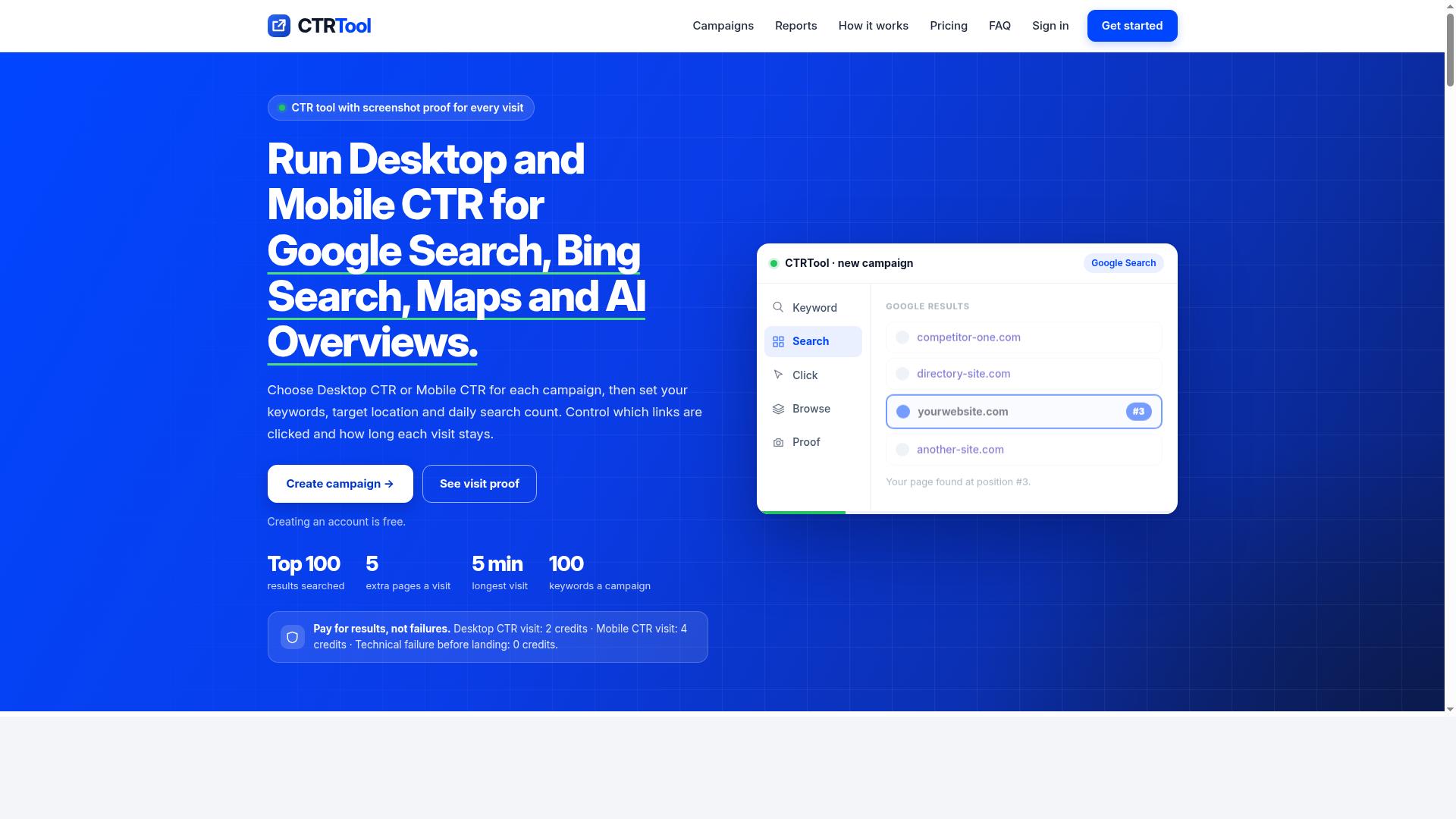
CTRTool is a SaaS platform that runs desktop and mobile click-through-rate (CTR) campaigns for Google Search, Bing Search, Google Maps, and AI Overviews, with screenshot proof for every visit. It is built for SEO professionals who want to influence CTR signals on the surfaces where their pages actually appear.
The core promise is simple: verifiable evidence for every visit. Rather than asking users to take results on trust, CTRTool delivers screenshots as proof of each campaign visit.
Campaign setup is structured around a few clear choices. Users select Desktop CTR or Mobile CTR per campaign, then define the keywords and target location they want to reach. A daily search count setting controls pacing across the campaign.
Beyond targeting, users also control which links are clicked and how long each visit stays. That session duration control matters because dwell time is one of the user engagement metrics that behavioral analytics can pick up on.
Proof is delivered in two forms. CTRTool provides separate search and landing screenshots, so users can see both the SERP behavior and the destination page for each visit.
CTRTool is transparent about limits. The site states plainly that automated visits do not guarantee rankings. That framing sets realistic expectations and keeps the tool positioned as one input among many in search engine optimization work.
In short, CTRTool is a campaign management platform for CTR simulation across four search surfaces, with targeting, pacing, session controls, and screenshot verification built in. Understanding that baseline makes it easier to see why certain usage mistakes can undercut dwell time and the engagement signals a campaign is meant to support.
The Four Mistakes, and How CTRTool's Design Avoids Them
Most CTR campaigns fail for four predictable reasons: missing proof, weak targeting, wasteful click behavior, and no tracking, each of which CTRTool's architecture is built to prevent. These failures rarely announce themselves. A campaign can look fine in a dashboard while every visit is quietly flagged, misrouted, or wasted.
The four mistakes are:
- Sending visits with no proof and no full visit path
- Ignoring device, location and keyword targeting
- Mismatched click behavior that burns credits
- No position or citation tracking over time
Each one damages dwell time and user engagement metrics in a different way, and each has a matching design decision inside CTRTool. The sections below walk through the first three in detail, showing what goes wrong and how the tool's structure closes the gap.
Mistake 1: Sending Visits Without Proof or Full Visit Paths
Without verifiable proof, a CTR campaign is indistinguishable from bot traffic, and platforms increasingly flag suspicious patterns. If you cannot show what a visit looked like, you cannot audit it, defend it to a client, or tell a legitimate session apart from a failed one. That is a serious problem in an environment shaped by click fraud detection and behavioral analytics.
CTRTool treats proof as a first-class feature rather than an afterthought. Every visit includes screenshot proof, with the search and landing screenshots delivered as separate proof images. You see the query as it was entered and the page as it loaded.
Alongside the images, each visit carries a full visit path. That means you can verify the click sequence from the search results through to the internal pages that were viewed, rather than trusting a bare count of clicks. A recorded path is far easier to inspect than a summary line.
This evidence has a practical second life in reporting. Because the proof is captured per visit, it supports internal reporting and client transparency without extra reconstruction work. When someone asks what a campaign actually did, the answer is already documented.
CTRTool's positioning reflects this priority directly: it describes itself as a CTR tool with screenshot proof for every visit, covering Google Search, Bing Search, Maps and AI Overviews. For teams worried about traffic quality, that paper trail is the difference between a defensible campaign and an unverifiable one.
Mistake 2: Ignoring Device, Location and Keyword Targeting
Sending clicks from the wrong devices or locations creates unnatural click distribution that search engines can easily detect. Mismatched device fingerprints, IP rotation without residential proxies, or irrelevant locations all produce click patterns that look artificial next to genuine search behavior.
CTRTool builds targeting into campaign setup instead of leaving it to guesswork. Users choose Desktop CTR or Mobile CTR per campaign, so the device profile matches the intent of the campaign rather than defaulting to one shape for everything.
Location targeting goes well beyond a single country field. Campaigns can be set to a country, an optional state or city, or Any country. Delivery runs through Desktop Chrome windows and real Android phone sessions matched to the target location through managed proxy routes, which keeps the source of each click plausible.
Keyword targeting is tied to visibility. Campaigns only run when the page appears in the top 100 organic results for the chosen keyword and location. If the page is not ranking there, the visit does not proceed, which prevents clicks from arriving through a search path a real user could not have taken.
The result is a click distribution that lines up with how people actually search. Device, location and keyword all agree with one another, which is exactly the consistency that search engine optimization teams need when they want engagement signals to read as natural rather than manufactured.
Mistake 3: Mismatched Click Behavior That Wastes Credits
Clicks that bounce immediately or land on irrelevant pages waste credits and can harm rankings through pogo-sticking signals. Short session duration, a high bounce rate, and query-document mismatch all tell a search engine that the result did not satisfy the visitor.
CTRTool addresses this on two fronts. First, campaigns can target internal pages rather than only homepages. Sending a visit to the page that actually answers the query improves title tag relevance and meta description accuracy, which supports better search intent alignment from the very first second.
Second, the system aims to protect dwell time by simulating realistic session durations. Visits can run up to five minutes in total, with up to five additional internal pages per visit. That structure gives a session room to resemble genuine reading and navigation instead of a single instant exit.
The cost angle makes this urgent. Credits are consumed per visit, at 2 credits for a Desktop CTR visit and 4 credits for a Mobile CTR visit, so a wasted click is money spent for nothing. A visit that fails technically before landing costs 0 credits, and a verified search without a match costs 1 credit, which keeps some of the waste contained.
Behavior matching is therefore not a cosmetic detail. It is the difference between spending credits on sessions that reinforce user satisfaction signals and spending them on clicks that undercut the page they were meant to support.
Mistake 4: Running Campaigns Without Position or Citation Tracking
Without tracking keyword positions or AI citation order, you cannot tell whether a CTR campaign is actually moving rankings or just burning credits. A campaign that runs blind offers no feedback on how the ranking algorithm responds or whether SERP behavior changes at all. You end up guessing, and guessing is expensive.
This matters because the whole point of a CTR manipulation tool is to influence user engagement metrics in a way that supports visibility. If you never measure the outcome, you have no way to separate a campaign that helped from one that quietly wasted your budget. Behavioral analytics only become useful when you connect them to something observable in the results.
CTRTool closes that gap by tracking keyword positions over time. That includes Maps listing order and AI citation order, so you can see movement rather than assume it. The tracking turns a blind campaign into a feedback loop you can actually act on.
The platform also sets clear preconditions that make tracking meaningful:
- The page must appear within the top 100 organic results for the chosen keyword and location.
- Maps campaigns check up to 50 listings, roughly five pages.
- AI Overview campaigns require a matching citation to qualify.
Those checks matter for traffic quality. A campaign pointed at a page that does not rank, or a listing outside the checked range, cannot produce a signal you can read. The eligibility rules keep you from spending on placements that will never show up in the tracking data.
With positions logged over time, decisions become data-driven. You can compare a keyword's movement against session duration, bounce rate, and pogo-sticking patterns to judge whether the campaign supported user satisfaction signals or only inflated clicks. That is the difference between a tool used well and credits spent on hope.
One honest note: CTRTool explicitly does not guarantee higher rankings, leads, or sales. Tracking is what lets you verify whether anything moved, not a promise that it will. Used that way, position and citation monitoring is the piece that turns a CTR campaign into a measurable part of your search engine optimization work.
Key Features That Protect Dwell Time
Dwell time is a critical user engagement metric, and CTRTool's feature set is designed to simulate realistic session durations rather than drive-and-drop traffic. Each feature addresses a specific signal that behavioral analytics systems review when they score traffic quality.
When these features work together, a campaign looks less like automated clicking and more like a genuine visitor who read, navigated, and stayed. That distinction matters for user satisfaction signals and for the long-term health of a ranking algorithm relationship.
Full visit paths are the foundation. Instead of a single hit that opens and closes a page, CTRTool builds visits of up to 5 minutes with up to 5 additional internal pages. A visitor who lands on a blog post and then moves to a related article, a category page, or a contact page produces a session that resembles organic navigation.
This matters because bounce rate and pogo-sticking are the first red flags in behavioral analytics. A drive-and-drop visit ends in seconds with no onward movement, which reads as a mismatch between the query and the page. A multi-page path reads as a visitor who found value and kept exploring.
As a concrete example, a campaign targeting a blog post can be configured for a 2-minute session that continues onto two internal pages. That pattern is far closer to a real reader than a two-second exit, and it supports the session duration signal that search engines weigh.
Internal page targeting keeps the visit relevant to the entry point. When the additional pages in a visit relate to the landing page's topic, the session tells a coherent story: the visitor arrived for a subject and stayed within that subject. Random onward clicks create query-document mismatch signals instead.
This connects directly to search intent alignment. If someone lands on a guide about keyword research and then jumps to an unrelated product page, the path looks unnatural. Targeting internal pages that fit the topic protects content relevance and keeps the session believable.
It also reinforces title tag relevance and meta description accuracy. A visitor who clicks a result and then explores matching content confirms that the snippet promised what the page delivered, which is exactly the feedback loop ranking systems look for.
Device and location targeting aligns each visit with a realistic user profile. CTRTool matches visits to the requested device and location, and visits that cannot verify the requested location use no credits. That policy keeps campaigns honest about what was actually delivered.
Mismatched profiles are a classic click fraud detection trigger. A click from a desktop browser in one region for a campaign aimed at mobile users elsewhere stands out in device fingerprinting and browser fingerprint reviews. Consistent targeting avoids that inconsistency.
Location accuracy also protects click distribution patterns. When clicks arrive from the intended geography, the campaign blends into normal regional traffic instead of clustering in improbable places. This supports traffic quality without needing to explain away anomalies later.
Screenshot proof closes the loop by verifying session quality after the fact. CTRTool provides search and landing screenshots as separate proof images for every visit, so each session can be checked rather than assumed.
This feature supports accountability in a category where bot traffic and unverified claims are common concerns. Screenshots let a campaign owner confirm that the visit actually happened as configured, including the search step and the landing step.
The credit model reinforces the same principle. CTRTool uses a pay-for-results model with no credits charged for technical failures before landing, and one credit balance is shared across all campaign types, websites and keywords. Unused credits roll over while subscribed, and accounts support up to 100 campaigns with 100 keywords each.
Together, these features support user engagement metrics from several angles at once: realistic duration, relevant navigation, believable profiles, and verifiable delivery. That combination is what separates protected dwell time from traffic that collapses under scrutiny.
Pricing and Plans
CTRTool offers monthly plans in USD: Starter at $59/month for 2,000 credits (up to 1,000 Desktop CTR visits or 500 Mobile CTR visits) and Growth at $125/month for 5,000 credits (up to 2,500 Desktop or 1,250 Mobile visits). Both tiers bill monthly, and creating an account is free. That makes it easy to see how budget choices feed into the mistakes covered above, because running campaigns too thin or too wide is often a planning problem before it becomes a dwell time problem.
The full lineup scales with campaign size. Growth is marked Recommended, and two larger tiers serve heavier workloads:
| Plan | Price | Credits | Desktop Visits | Mobile Visits |
|---|---|---|---|---|
| Starter | $59/month | 2,000 | Up to 1,000 | Up to 500 |
| Growth (Recommended) | $125/month | 5,000 | Up to 2,500 | Up to 1,250 |
| Scale | $399/month | 20,000 | Up to 10,000 | Up to 5,000 |
| Agency | $699/month | 40,000 | Up to 20,000 | Up to 10,000 |
Credit consumption follows a simple rule. A Desktop CTR visit costs 2 credits, while a Mobile CTR visit costs 4 credits, which is why the mobile visit caps sit at half the desktop numbers. A verified search without a match costs 1 credit, and a technical failure before landing costs 0 credits.
Unused credits roll over while a subscription stays active, and they expire when cancellation takes effect. CTRTool also displays limited launch pricing, noting that prices rise 30% on November 15. Custom development carries a separate, agreed one-time fee.
For anyone worried about the mistakes in this article, the credit structure matters. A budget that only covers a small pool of visits encourages spreading activity too thin across too many pages, which weakens click distribution and the session duration signals that support dwell time. Matching the plan to the number of pages you intend to support is the practical fix.
Who Should Use CTRTool
CTRTool is built for SEO practitioners and agencies running CTR campaigns for their own or client websites across Google Search, Bing Search, Google Maps, and AI Overviews. It is a CTR manipulation tool designed for people who already understand how SERP behavior feeds into user engagement metrics.
The platform's guidance references tier links, PBNs, and test properties, which signals it is aimed at advanced link builders rather than beginners. If you are still learning the basics of search engine optimization, the tool's workflows may assume knowledge you do not yet have.
For experienced users, the core use cases are straightforward. You can improve click-through rate for target keywords, test how title tag relevance and meta description accuracy affect clicks, and track citations across Maps and AI Overviews.
- SEO practitioners managing campaigns for their own sites
- Agencies running campaigns on behalf of client websites
- In-house SEOs testing title and meta changes against real click data
- Advanced link builders working with tiered structures and test properties
It is equally important to know who should not use it. Anyone seeking guaranteed rankings or black-hat shortcuts will be disappointed, because no responsible tool can promise a fixed position in results.
Teams expecting instant wins should also look elsewhere. Dwell time and session duration respond to content quality and search intent alignment, not clicks alone. CTRTool supports testing, it does not replace editorial work.
The right user treats it as a measurement and testing layer. They pair campaign data with behavioral analytics to spot pogo-sticking and query-document mismatch, then fix the underlying pages. That is the profile CTRTool serves best, and the one most likely to see traffic quality hold up over time.
Final Verdict
CTRTool addresses the core pitfalls of CTR campaigns with screenshot proof, precise targeting, and position tracking, making it a credible option for SEOs who need verifiable engagement signals. The four mistakes covered in this article, unverified clicks, sloppy targeting, dwell time neglect, and weak tracking, all trace back to tools that leave users guessing. CTRTool is built to remove that guesswork.
Its strengths map directly onto the problems that hurt dwell time and SERP behavior. Each visit comes with proof you can check, targeting covers device, location, and keyword, and position tracking shows how rankings move over time. For anyone weighing a CTR manipulation tool, that combination is the difference between a campaign you can audit and one you have to take on faith.
The limitations deserve equal honesty. CTRTool is a CTR tool, not a guaranteed ranking solution. Results still depend on content quality and search intent alignment, and no amount of engagement can rescue a page that fails to satisfy the query behind a click. Treat it as one input into search engine optimization, not a substitute for it.
For SEOs and agencies, the recommendation is straightforward. If you want campaigns with verifiable proof, precise targeting, and tracking that supports behavioral analytics, CTRTool is a sound fit. If you expect rankings without fixing title tag relevance, meta description accuracy, or query-document mismatch, no tool will deliver that.
Questions can go to the support email listed on the site, vaibhav@autoblogging.ai, and full details are available at https://ctrtool.com. The site also lists Sign in, Create an account, Support, Terms of use, and Legal notices pages for account and policy information.
Frequently Asked Questions
What are the most common CTR manipulation mistakes that hurt dwell time?
The biggest mistakes are sending visits that bounce within seconds, using mismatched keywords or locations, skipping mobile campaigns when most traffic is mobile, and failing to verify that clicks actually landed on the intended page. Each of these creates engagement signals that look unnatural, which can undermine dwell time rather than improve it. CTRTool helps you avoid these pitfalls by letting you choose Desktop or Mobile CTR per campaign, set precise keywords and target locations, and review screenshot proof for every visit.
How does CTRTool's screenshot proof help me protect dwell time?
CTRTool provides screenshot proof for every visit, with search and landing screenshots captured as separate proof images. This lets you confirm that each visit actually reached your target page from the correct keyword and location, so you can catch problems like wrong landing pages or mismatched searches before they drag down engagement metrics. Full visit paths are also included, giving you a clear view of how each session progressed.
Can I run separate desktop and mobile campaigns to improve engagement signals?
Yes. CTRTool lets you choose Desktop CTR or Mobile CTR per campaign, so you can align your campaign type with how your real audience searches. Running mobile campaigns when your traffic is predominantly mobile helps keep engagement patterns consistent with genuine user behavior. Campaigns are available for Google Search, Bing Search, Maps and AI Overviews.
Which keywords and locations can I target with CTRTool?
You set the keywords and target location for each campaign, choosing a country and optionally a state and city, or "Any country" to use a mix of supported locations. Your page must appear within the top 100 organic results for the chosen keyword and location, and Maps campaigns check up to 50 listings (about five pages). AI Overview campaigns require a matching source link.
How does CTRTool's credit-based pricing work?
CTRTool uses monthly plans priced in USD with pay-for-results credits. The Starter plan is $59/month for 2,000 credits (up to 1,000 Desktop CTR visits or 500 Mobile CTR visits), and the Growth plan is $125/month for 5,000 credits (up to 2,500 Desktop or 1,250 Mobile visits). This structure lets you scale campaign volume in line with your budget and engagement goals.
Where can I get help if my campaign isn't producing the dwell time results I expect?
You can reach CTRTool support at vaibhav@autoblogging.ai for assistance with campaign setup and troubleshooting. Before contacting support, review your visit screenshots and keyword position tracking to spot issues such as wrong landing pages or location mismatches. The site also includes Support, Terms of use and Legal notices pages for further reference.